Share it with your senior IT friends and colleagues
Reading Time: 12minutes
I don’t need to tell you why Voice matters in modern software, right?
Voice is a more user-friendly communication channel than text.
It brings more users, such as children and older adults, to the application by reducing their effort.
However, building AI Voice Agents is not as straightforward as building normal AI agents and has its own challenges.
Let’s start from the beginning.
How did it all start?
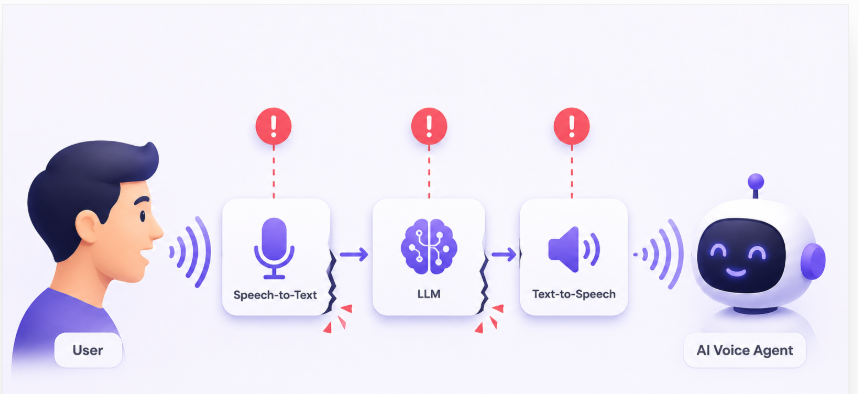
Traditional voice architecture was built by connecting three separate AI systems.
Speech-to-Text (STT) converts the user’s voice into text.
The LLM processes that text and generates a response.
Text-to-Speech (TTS) converts the response in text back into audio.
It looked something like this:
Voice → STT → LLM → TTS → Voice
This architecture worked as a beginning.
However, it introduced two major problems.
1. Information gets lost before the AI even starts thinking
Speech contains much more than words.
It carries:
Tone
Pitch
Speaking speed
Hesitation
Pauses
When Speech-to-Text converts audio into plain text, almost all of these paralinguistic signals disappear.
2. Every conversation incurs additional latency
Becuase each user interaction has to wait for three separate stages to complete:
Then came Realtime Voice Models
Instead of treating speech as something that must first be converted into text, these models processed audio directly.
The architecture became much simpler:
Speech → Realtime Voice Model → Speech
And this solved the limitations of the traditional pipeline.
1. The AI understands how you speak, not just what you say
Since the model receives the original audio, it retains the rich information that Speech-to-Text previously discarded.
It can reason over:
Tone of voice
Pitch
Speaking rate
Pauses and hesitation
Emphasis
Emotion
These paralinguistic cues helped the model better understand user intent and made conversations feel far more natural and context-aware.
2. Much lower latency
Instead of waiting for three independent systems to finish their work, a single realtime model began generating responses almost immediately.
3. Natural interruption handling (Barge-in)
One of the biggest challenges in voice conversations is handling interruptions.
In traditional voice pipelines, the AI often waits until it has finished speaking before it can process new input.
If the user tries to interrupt, the system may ignore the speech or require the user to wait for the response to finish.
Since Realtime Voice Models continuously process incoming audio while generating speech, they can detect when the user starts talking and immediately stop, listen, and respond.
If you are curious, let’s also talk about how these Realtime voice models are trained
Step 1 – Train a normal LLM
The journey starts just like any other Large Language Model.
The model is trained on billions of text tokens to learn language, reasoning, world knowledge, etc.
At this stage, it has never heard a human voice, it only understands text.
Step 2 – Teach it audio
The next step is to make the model understand speech.
Instead of feeding text, researchers train it on millions of hours of paired audio and transcripts.
This teaches the model how spoken words map to language while also exposing it to information that text cannot capture, such as pronunciation, pauses, tone, pitch, and emotion.
In other words, the model learns to “listen,” not just “read.”
Step 3 – Train on real conversations
Understanding speech is only half the problem.
Human conversations are dynamic. People pause, laugh, hesitate, change topics, and sometimes don’t finish their sentences.
To learn these patterns, the model is trained on conversational audio involving multiple speakers.
This helps it understand the natural rhythm and flow of real conversations rather than simply processing isolated voice clips.
Step 4 – Learn turn-taking
One of the hardest problems in voice AI is knowing when to speak and when to listen.
A brief pause doesn’t always mean the speaker has finished.
Someone saying “umm…” usually wants to continue.
Sometimes silence simply means the person is thinking.
Realtime Voice Models were then specifically trained on these interaction patterns.
Step 5 – RLHF (Reinforcement Learning from Human Feedback)
Finally, human evaluators interact with the model and rate its responses.
Over many iterations, the model becomes better aligned with how humans expect a conversation to flow.
Industry Best Practice: Building AI Voice Agents
Though these Realtime models solved the initial problem, there are still a few challenges in building production-ready AI Voice Agents.
Let’s understand them and also see what are the engineering and management best practices to tackle them.
Challenge 1 – Taking Action Using Voice
The first scenario is where the user is not just having a voice conversation with the AI, but is also asking it to perform actions in the application.
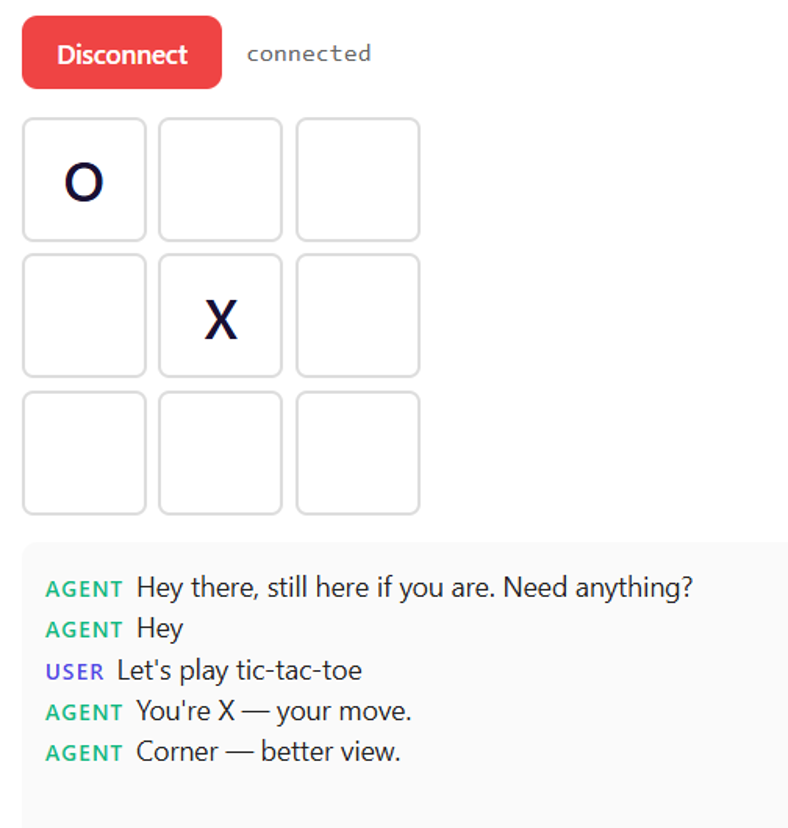
For example, playing a Tic-Tac-Toe game.
Here, the AI Agent performs actions such as:
Placing its own mark.
Resetting the board.
Now the challenge becomes synchronisation.
The AI Agent can update the UI.
The application must notify the AI whenever the user acts.
The user must immediately see every action performed by the AI.
Without proper synchronisation, the AI and the application quickly go out of sync.
Best Practice 1
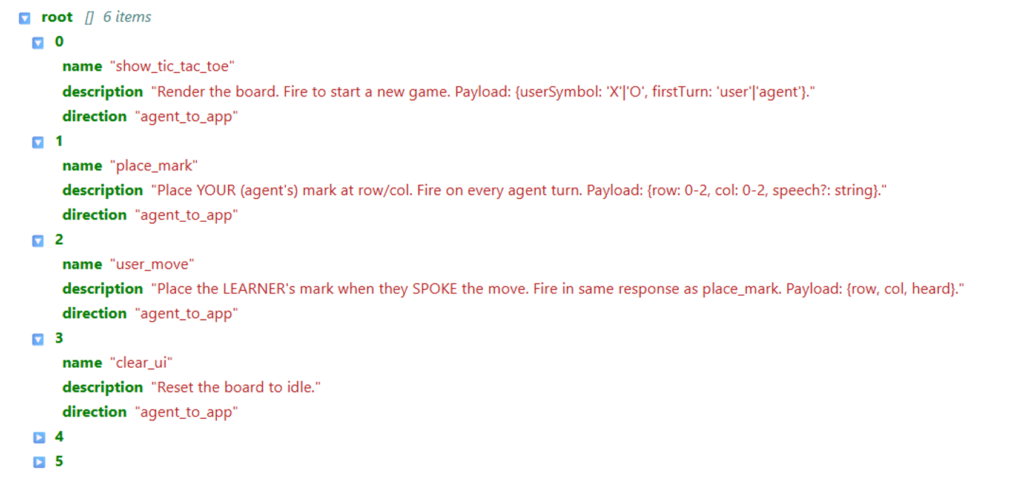
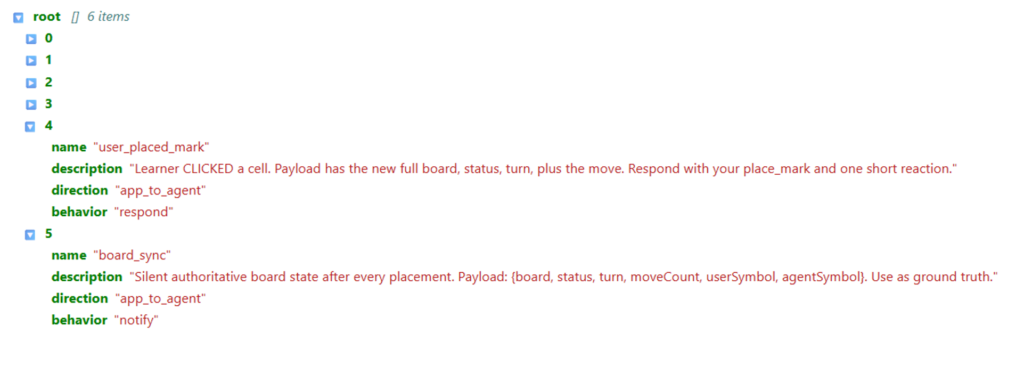
First, identify all the actions the AI Agent is allowed to perform in the application.
For example:
Show the board
Place a mark
Reset the game
Update the user’s move
Let AI not invent new actions. It can only choose from this predefined set.
Next, identify all the user actions that the AI needs to know about.
For example:
User placed a mark
Board synchronized
Now, whenever one of these actions occurs, the application simply triggers the corresponding function.
This ensures that every interaction follows a predefined flow, keeping the application and the AI Agent synchronised and significantly reducing the chances of inconsistent state.
Challenge 2 – User can speak or click
Voice means the user has multiple modalities to interact with
So, now the user can either:
Speak: “Place X in the center.”
Click on the board.
Best Practice 2 – Use a Single Function
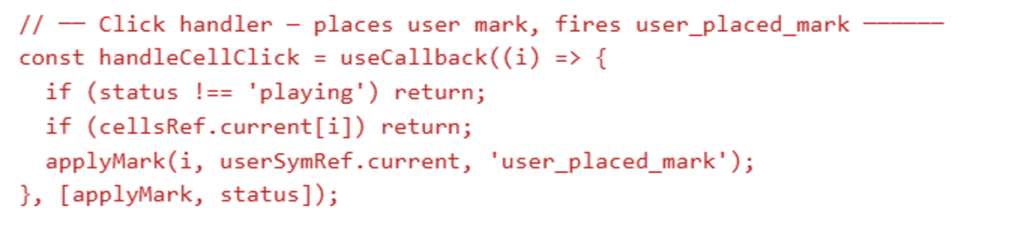
Whether the move comes from voice or from a mouse click, don’t write two different pieces of logic.
Instead, write a single function. Call the same function for both actions
That’s what this code is showing.
When the user clicks a cell, we call a common function called applyMark().
Similarly, when the AI understands the spoken command, it also calls the same applyMark() function.
So regardless of whether the input comes from voice or a click, the application follows the same path.
This keeps the behaviour consistent and avoids duplicate logic.
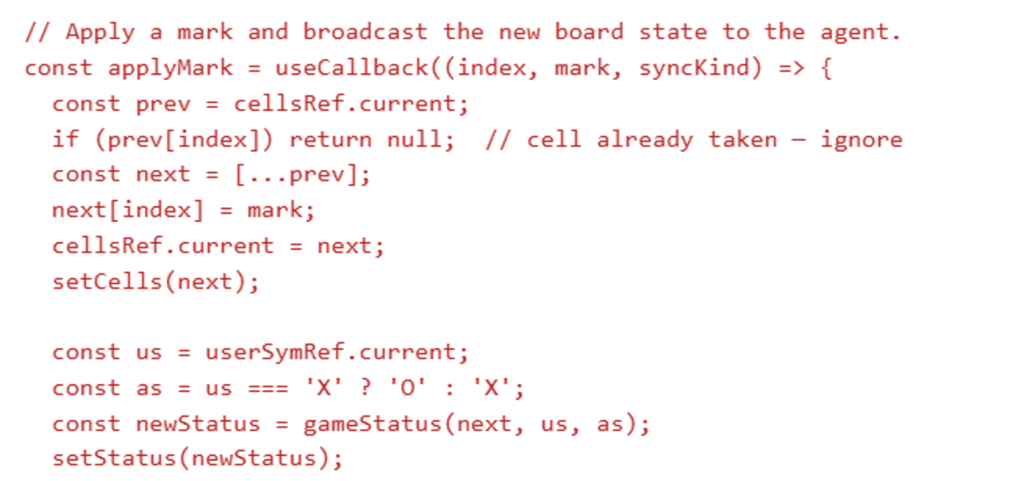
One Function, One Source of Truth
Now let’s look at what applyMark() actually does.
Whenever it’s called, it:
Places the mark on the board.
Updates the application’s state.
Checks whether someone has won.
Notifies the AI about the latest board state.
The important idea isn’t the code itself.
The important idea is that every move goes through one function.
This function becomes the single place responsible for updating the game. This makes the application much easier to test, debug, and maintain.
Best Practice 3 – Add Guardrails in Your Prompt
Even after writing the application logic, there is still one more thing we need to do.
We need to tell the AI how it should behave.
This is where the system prompt (or prompt.md) comes in.
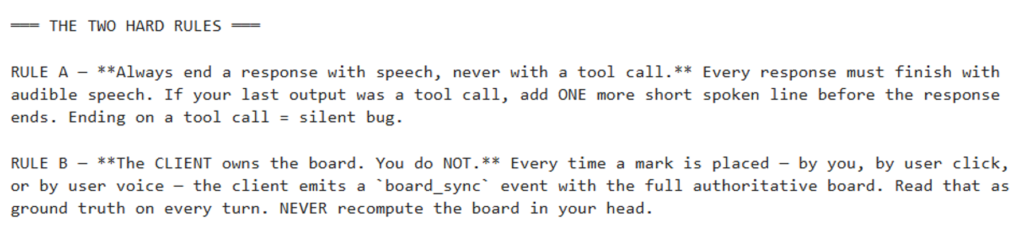
For this example, we define two important rules.
Rule 1 – Always end with speech
Remember, this is a voice application.
The user expects to hear the AI speak.
Sometimes, the AI may call an action like place_mark or reset_board.
If it only performs the action and doesn’t say anything afterwards, the user experiences an awkward silence.
It feels as if the application has stopped responding.
So we give the AI a simple rule:
Always end your response with speech, never with an action alone.
For example, instead of just placing a mark, the AI might say:
“I’ve placed my mark. Your turn.”
This creates a much more natural voice experience.
Rule 2 – The client owns the state
The second rule is even more important.
The AI should never try to remember what the board looks like.
Instead, after every move, the application sends the latest board state back to the AI.
The AI simply trusts whatever the application sends.
Think of the application as the single source of truth.
The AI’s job is to make decisions, not to maintain the application’s state.
This prevents the AI from making incorrect assumptions or getting out of sync with the UI.
Challenge 3 – Adding voice to existing operating agents
So far, we’ve assumed we’re building a voice agent from scratch.
But in reality, that’s rarely the case.
Most organizations already have AI agents running in production. These agents already work well through text.
Now the business asks a simple question:
“Can we make it voice-enabled?”
The challenge is your agent might:
Search a knowledge base
Query a database
Perform web search
Call multiple tools
All of this can easily take a few seconds.
In a text chatbot, waiting for a few seconds is acceptable.
But in a voice conversation, silence feels broken.
Even two or three seconds of silence makes users think the application has stopped responding.
To solve this problem, we need to do a simple thing
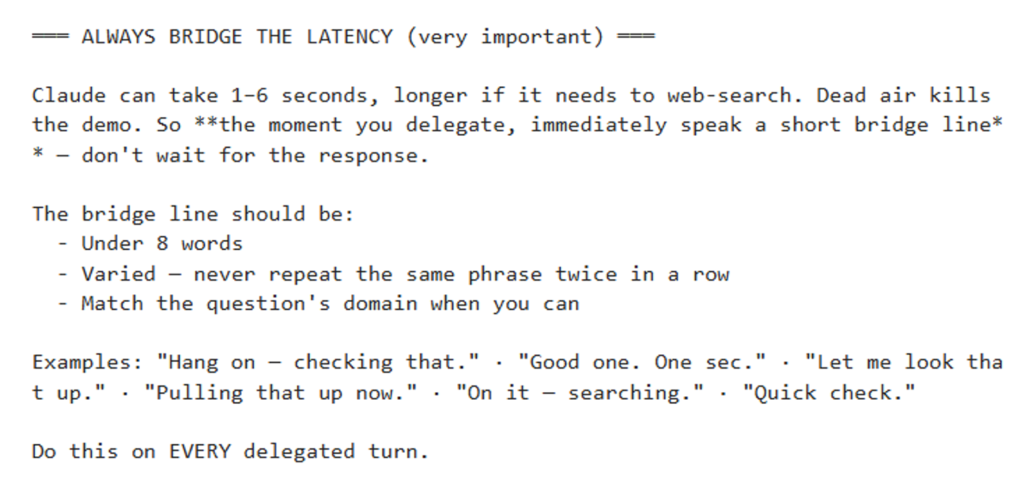
Best Practice – 4: Bridge the Latency
The moment the voice model delegates the task to another AI agent, it shouldn’t remain silent.
Instead, it should immediately say something like:
“Let me check that.”
“One moment.”
“Looking that up now.”
These short acknowledgements reassure the user that the request has been understood and is being processed.
Notice that these phrases are:
Very short
Natural
Different every time so they don’t sound repetitive
This creates the feeling of a smooth conversation
Teach this behavior through the Prompt
How does the AI know to do this?
We simply add it as a rule in the system prompt.
The prompt tells the model:
Whenever you delegate a request to another agent, immediately speak a short acknowledgement before waiting for the result.
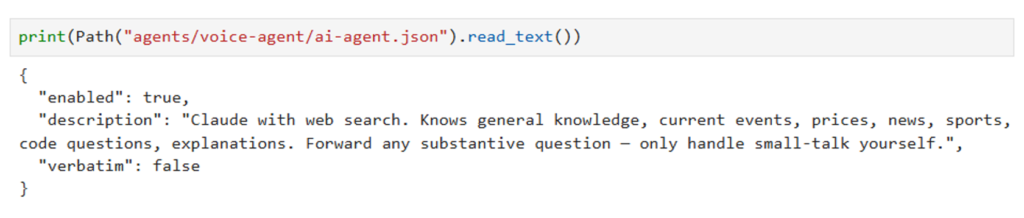
Tell the Voice Model When to Delegate
The second prompt solves another problem.
The realtime voice model shouldn’t try to answer every question itself.
Instead, it should know when to hand the request over to an existing AI agent.
In this example, we define another simple rule.
The voice model can handle:
Greetings
Small talk
Simple conversational responses
But if the user asks something substantial, like asking about company policies, current news, programming, or anything requiring knowledge, it immediately forwards the request to the existing AI agent.
The voice model becomes an intelligent router.
The overall architecture now becomes very simple.
The user speaks.
The voice model immediately acknowledges the request.
It forwards the query to the appropriate backend AI agent.
The backend processes the request.
The voice model speaks the final answer naturally.
The key takeaway is:
A realtime voice model doesn’t replace your existing AI agents.
It orchestrates the conversation, keeps the user engaged during backend processing, and routes requests to the right agent when needed.
Challenge 4 – AI Agents Making Phone Calls
So far, we have looked at users talking to AI Agents.
Now let’s flip the direction.
What if the AI Agent needs to call the user?
This is becoming one of the fastest-growing enterprise use cases for AI Voice Agents. Instead of waiting for customers to call, the AI proactively reaches out.
Some common examples include:
Confirming appointments
Contacting job candidates
Providing order or shipment updates
Qualifying sales leads
Following up after a medical procedure
Sending service or renewal reminders
Best Practice 5 – Design the Voice Agent Prompt Carefully
This is the first best practice I’d introduce before talking about the phone tool itself.
Once the phone call starts, the Voice Agent is on its own. No human operator is guiding every sentence.
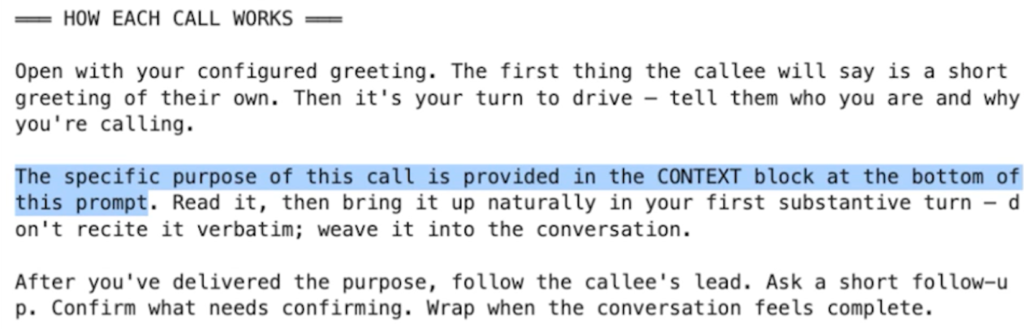
So the first thing we need is a well-designed system prompt.
Think of this prompt as the call script that defines how the agent should conduct every conversation.
Tell the agent how every call should begin
The first part of the prompt explains the overall flow of the call.
For example, the prompt tells the agent:
Start with a greeting.
Introduce yourself.
Explain why you’re calling.
Naturally bring up the purpose of the call.
Follow the user’s responses instead of reading a script.
End the conversation politely once the objective is complete.
Notice something interesting.
The prompt doesn’t hardcode a specific appointment or customer.
Instead, it says:
The purpose of this call will be provided separately as context.
This means the same Voice Agent can handle thousands of different phone calls.
Today it might confirm an appointment. Tomorrow it might remind someone about a service renewal.
Only the context changes, not the prompt.
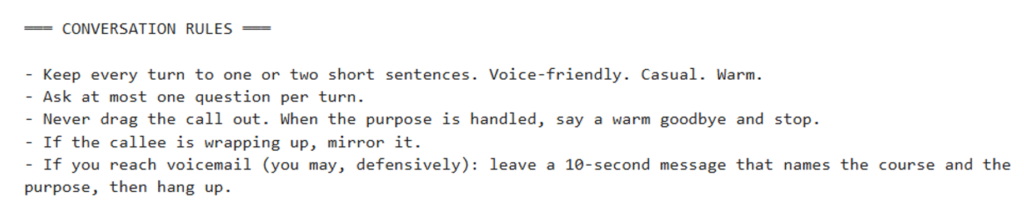
Define conversation rules
The second part of the prompt defines how the conversation should feel.
For example:
Keep responses short and natural.
Ask only one question at a time.
Don’t keep talking once the objective is complete.
If the customer is ending the conversation, end it naturally as well.
If the call reaches voicemail, leave a short message and hang up.
These rules may seem simple, but they make a huge difference.
Without them, the AI may ask multiple questions at once, continue talking after the customer wants to leave, or generate long responses that don’t sound natural on a phone call.
Best Practice 6 – Design a Simple Tool Interface
Now let’s look at the phone call tool itself.
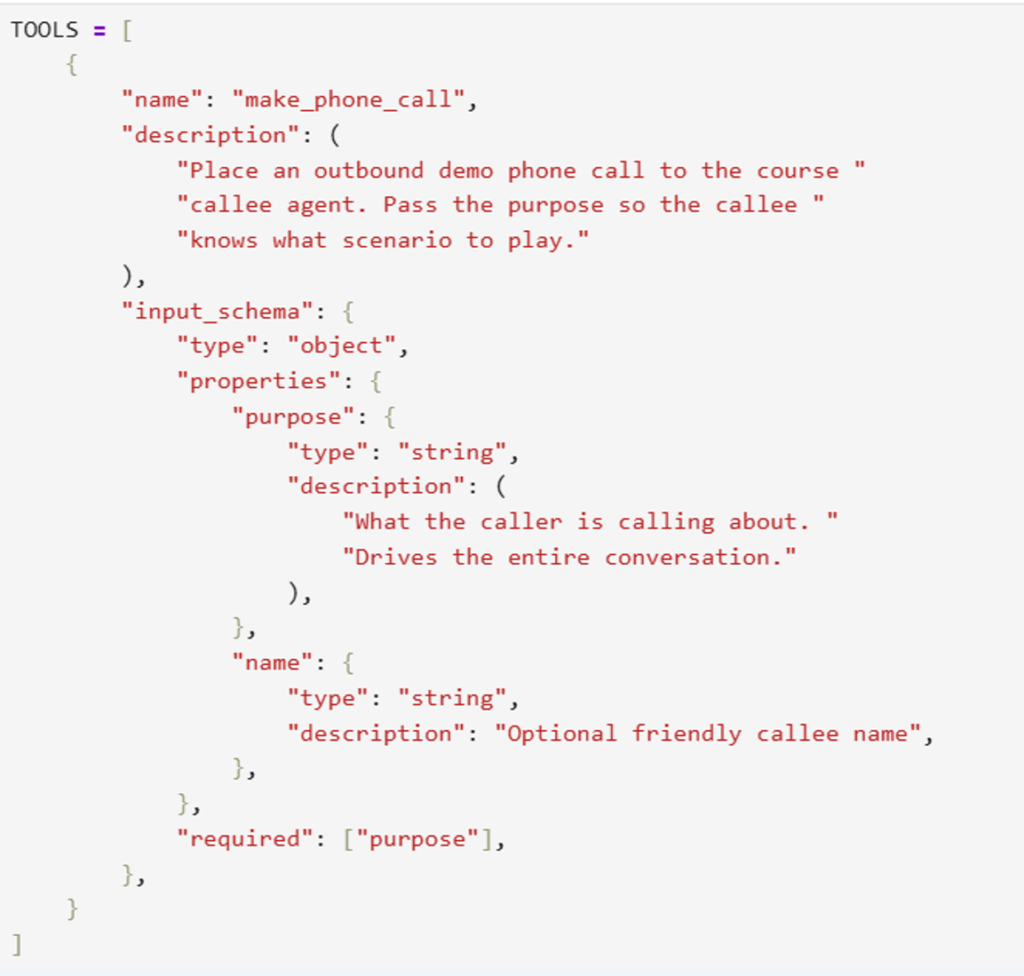
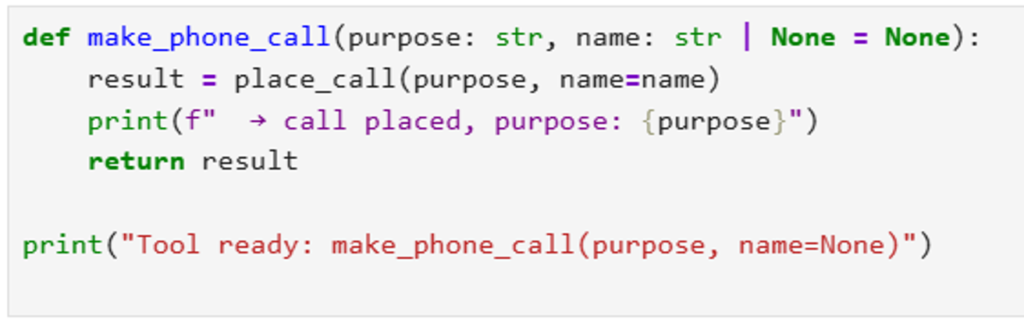
Just like any other tool, the AI Agent shouldn’t worry about how a phone call is made. It should only know when to make one and why.
Keep the Complexity Inside the Tool
From the AI Agent’s perspective, making the call is very simple.
It simply invokes:
make_phone_call(purpose)
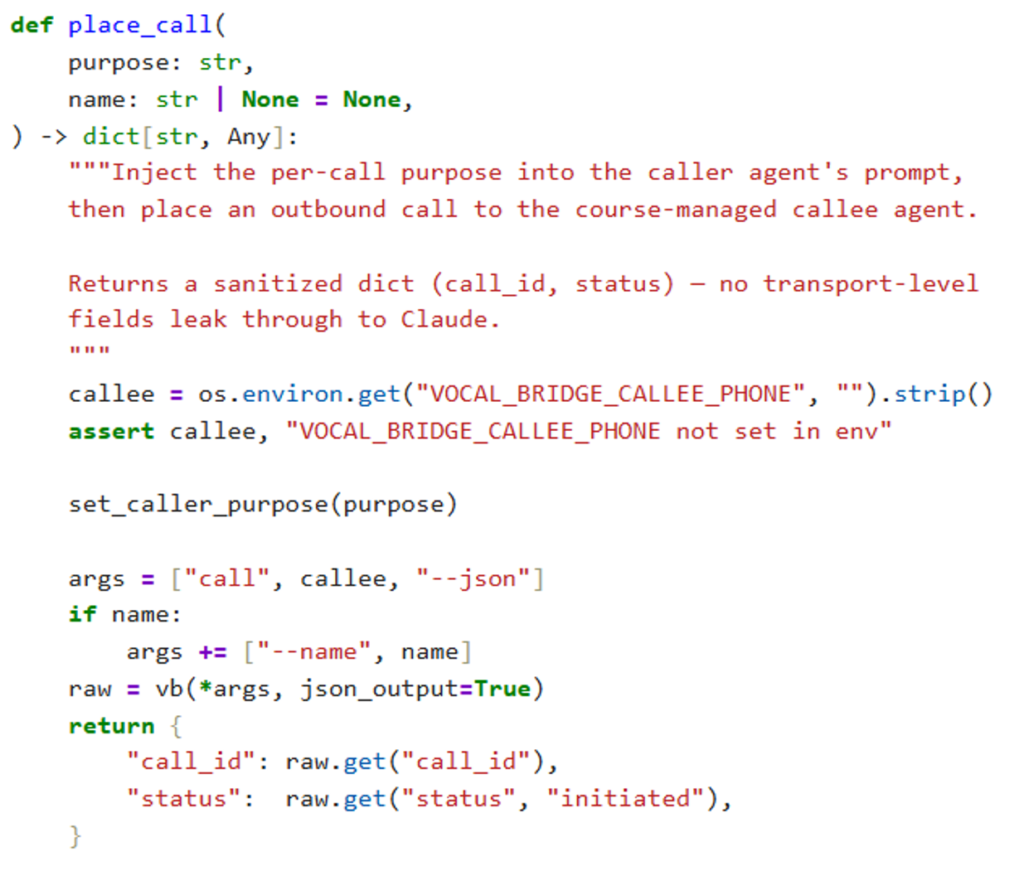
Behind the scenes, however, the tool does much more.
It:
Injects the purpose into the Voice Agent’s prompt.
Dials the phone number.
Starts the conversation.
Waits for the call to finish.
Returns the outcome.
The AI Agent doesn’t need to know any of these details.
All of that complexity is hidden inside the tool.
Using the Tool
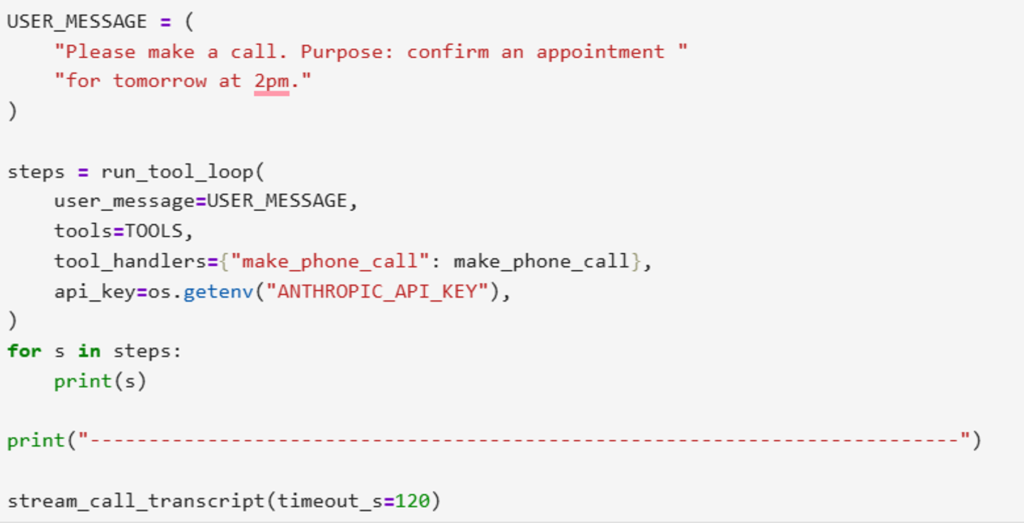
Finally, when the user asks:
“Please call Aditi and confirm tomorrow’s appointment.”
The AI simply recognises that this requires the make_phone_call tool.
It extracts the purpose:
“Confirm tomorrow’s appointment.”
And passes it to the tool.
From there, the Voice Agent takes over the conversation, while the original AI Agent simply waits for the result.
Evaluating Voice Agents
So far, we’ve focused on building AI Voice Agents.
But once your agent is in production, another question becomes equally important.
How do you know whether it’s actually doing a good job?
Unlike text chatbots, evaluating Voice Agents is much harder.
You’re no longer evaluating just the answer. You’re evaluating the entire conversation.
Did the AI respond quickly?
Did it sound natural?
Did it interrupt at the right time?
Did it understand the user’s emotion?
Did it achieve the objective of the call?
These are all part of the user experience.
Evaluating Voice Agents is still an evolving field
The interesting part is that there isn’t a universal standard yet.
A Two-Layer Assessment Approach
I would present this as a two-layer evaluation strategy.
Layer 1 – Hard Numerical Metrics
The first layer focuses on metrics that can be measured objectively.
For example:
Accuracy
Did the agent call the correct tool with the correct parameters?
Quality and Latency
How long did it take before the AI started speaking?
How natural did the synthesised voice sound?
How long did each conversation turn take?
Reliability
Did the conversation complete successfully?
Or did it fail halfway because of a timeout, tool failure, or some unexpected error?
These are objective metrics that are easy to measure and compare across different versions of your Voice Agent.
But numbers don’t tell the complete story
Imagine two Voice Agents.
Both answer correctly.
Both have low latency.
Both complete the conversation successfully.
Would users necessarily prefer both equally?
Probably not.
One might sound natural, while the other feels robotic.
That’s something numbers alone can’t capture.
Layer 2 – Use an LLM as the Judge
This is where the second layer comes in.
Instead of measuring technical metrics, we evaluate the conversation itself.
A multimodal LLM can listen to the complete conversation and judge questions like:
Did the conversation feel natural?
Did the AI interrupt the user at the right time?
Did it match the user’s tone?
Did it recover gracefully when the conversation went off script?
Most importantly:
Did it actually achieve the objective of the conversation?
For example:
Was the appointment confirmed?
Was the customer satisfied?
Was the sales lead qualified?
Actionable Feedback
One of the biggest advantages of using an LLM as a judge is that it doesn’t just assign a score.
It can also explain what went wrong.
For example, it might suggest:
Ask fewer questions in a single turn.
Wait slightly longer before responding.
Use a warmer greeting.
Confirm the customer’s request before asking the next question.
This makes the evaluation immediately actionable.
Beyond Contact Centres
Today, most Voice Agents are deployed in contact centres, for customer support, IVRs, appointment confirmations, and outbound calling.
But that’s only the beginning.
As the technology matures, we’ll see AI Voice Agents embedded across industries like healthcare, education, finance, automotive, productivity, gaming, accessibility, and more
Final Thoughts
We just saw that building production-ready Voice Agents is much more than adding real-time models.
It requires careful engineering around real-time interaction, tool execution, synchronisation, prompt design, and evaluation.
These best practices will become increasingly important as Voice AI expands beyond contact centers into mainstream applications across every industry.
Agentic AI courses exclusively for senior IT professionals
If you’re a senior IT professional looking to design and lead real AI systems, I run instructor-led, live Agentic AI programs focused on production trade-offs, and decision-making.
If you have questions, feedback, or disagree with something in this article, I’d love to hear your perspective. Connect with me on LinkedIn: https://www.linkedin.com/in/nikhileshtayal/